How to capture and stream video from a PS4

Showing off exactly how you play is a huge part of the modern gaming experience. Live streams and Let’s Play videos are increasingly common, and barriers to entry are lowering every year. Capturing and streaming gameplay from the PS4 can now be accomplished from the device itself, and a small hardware investment nets some incredibly high-end results. With a little bit of effort, anyone can stream and capture console video without an elaborate or expensive set-up.

Today, I’m going to walk you through the process of capturing and streaming PS4 gameplay on the device itself and using the excellent Game Capture HD60 from Elgato. Cameras and microphones are an optional addition, but you won’t need any other specialty gear to get up and running.

Share

Built-in video capture

Continue reading How to capture and stream video from a PS4

Twitch Bans Streaming of Adults Only Video Games

The company does not want individual evaluations

Video game streaming service Twitch is announcing that it will no longer allow its users to stream video games that have received an Adults Only rating from the ESRB as it seeks to make sure that the audience is now exposed to any sort of nefarious content.

The company says that it is changing its policy to make sure that it no longer needs to rule for individual titles in the future, a process that left some gamers frustrated.

Continue reading Twitch Bans Streaming of Adults Only Video Games

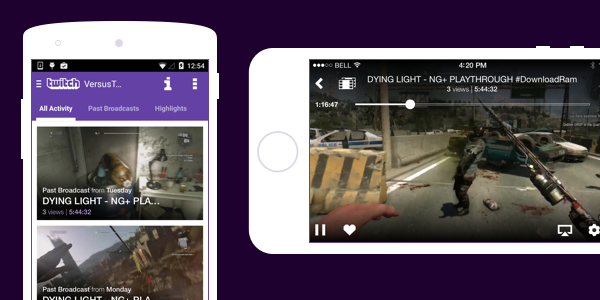
Video On Demand Comes To Mobile!

You’ve been asking for it, we’ve been working on it, and it’s finally here: VODs on mobile! You will now be able to watch highlights and past broadcasts from all Twitch Partners and a growing number of broadcasters whose videos are HLS enabled.

Available VODs are found on a channel’s Activity Feed. There are two ways to get there:

  • If you’re watching a live channel, tap the Activity Feed icon located on the player. For iOS this is on the top left of the player, and for Android it’s on the bottom left.
  • If you’re on the Search page or Following directory, tapping any offline channel will also take you directly to the Activity Feed.

A note for our Android users

With this release, we’ve made some changes to our Android app to address a possible security vulnerability.  The change requires you to download and install a completely new app rather than update the old one. We know this isn’t ideal, and we’ll do our best to make it a one-time deal.

To get our new v4.0 app, visit g.co.play/twitchapp. After you’ve installed the new app, make sure you delete the old one (v3.2.3) from your device, as we will no longer support it starting May 20th, 2015. We apologize for this inconvenience and appreciate your patience.

EDIT:  To use our new v.4.0 app, you will also need to be on Android 4.1+.  For users who are on lower versions of Android, please do not delete the app.  Note: v3.2.3 will not contain VODs.

The post Video On Demand Comes To Mobile! appeared first on The Official Twitch Blog.