Tag Archives: Streaming

YouTube to Relaunch Live Streaming

Inside sources have released information regarding YouTube’s intention to launch its own live streaming platform

Inside sources have reported for The Daily Dot that YouTube is bound to reintroduce its streaming platform.

After rumors suggesting that YouTube might acquire the famous video game streaming platform known as Twitch were scattered by the fact that Amazon ended up buying the gaming platform, with the reasons behind this change of plans remaining unknown to this date, YouTube seems prepared to start anew.

But the thing is that if YouTube does initiate a streaming service mainly focused on gaming, then it will most definitely have to compete with Twitch.

YouTube has done live streaming before

It is not the first time YouTube is experimenting with live streaming, as it has broadcast some important events before, but the idea didn’t really take off, so the platform stopped promoting this type of services.

Furthermore, YouTube is no stranger to gaming, as there are many famous YouTube channels dedicated to video gaming, although most of them are pre-recorded.

Nonetheless, one of the best known is also the most subscribed to: PewDiePie, which has garnered more than 30 million subscribers and approximately 8 billion views. Other gaming channels just as famous as the one mentioned above are VanossGaming, Sky Does Minecraft or Vegetta777.

However, by now YouTube should be perfectly aware of the fact that, if it does go through with the live streaming idea, it will have some hard time fighting against Twitch, a platform which has gained so much influence so far.

An inside representative declared for The Daily Dot that “Gaming and esports in particular are going to be a big driving force for the new-look YouTube Live. There’ll be huge opportunities for established streamers and organizations soon and I would say that the record numbers of esports viewers are only going to grow when Google start promoting and partnering with these events.”

And if the fact that Google will handle the promotions is true, then YouTube Live might have a huge advantage over the world’s leading video platform.

What’s more, the YouTube Live service is expected to come into being sometime in June, at the E3 2015, the annual video game conference and show in Los Angeles.

People and gamers in particular are looking forward to this event to see what YouTube will put forward and how it plans to compete with the major existing force on the market.

Originally posted on Softpedia

Photo credits: YouTube

Dailymotion launches Twitch competitor for video game streaming

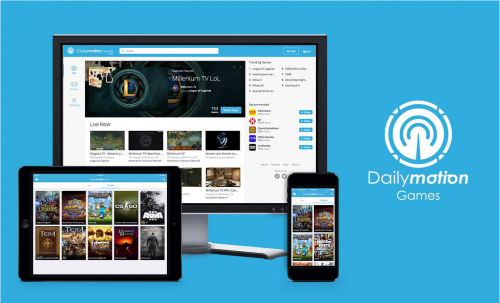
Paris-based online video platform Dailymotion wants a piece of the video game streaming pie: the company launched a new live streaming service called Dailymotion Games Wednesday. The service basically tries to do what Twitch has been doing so successfully: Offer video gamers a way to live stream their gameplay so they can attract a big audience for tournaments, review games in front of a live audience or simply show off their skills.

dailymotion

Dailymotion Games is available on the web, as well as via dedicated apps for iOS, Android and for Sony’s PS4.

Dailymotion already sees more than 180 million video views per month for video game content, the company revealed Wednesday, adding that more than 11 million unique visitors tune into video game content every month.

But it’s likely that not just the own metrics prompted Dailymotion to go down this route: Industry leader Twitch not only managed to attract a monthly audience of 60 million video game fans, the site was also acquired for $970 million in cash last summer. Dailymotion on the other hand has had troubles to find an exit: The company was talking about selling to Yahoo two years ago, but French regulators put an end to the sale, balking at the idea that am American company would own more than 50 percent of Dailymotion.

Steam Broadcasting works great, but Twitch isn’t threatened yet

Steam Broadcasting works great but Twitch isn't threatened yet

The first thing I watched with Steam’s new livestreaming service was Dragon Ball Z. Then I shot over to another instance of Media Player Classic to watch some other anime I couldn’t identify. When the stream cut out, the chat filled with one viewer’s cries of “FUCK THE MODS WE RUN THIS SHIT.”

Just like Steam’s tagging functionality, which initially had undesirable results, it’s going to take some time for Valve to get Steam Broadcasting right, which may include protecting itself from legal repercussions (and I can’t imagine the complexity involved in doing so). For that reason and more, cries of “Twitch is dead” are massively premature. I’m not even sure Valve is gunning for the current leader in livestreaming, and after playing with the beta release today, I don’t think it’s any competition yet. I do like it, but it offers something different—an easy way to share with friends.

And Valve does have advantages. When I want to Stream on Twitch, I set up OBS, test it, then tell everyone on Twitter that it’s happening and hope for some viewers. On Steam, which already houses most of the games I play, I just set it up once and play any game in my library. The streams are a good quality (mostly), and I haven’t had performance problems while playing. My biggest fear is that I’ll forget I’ve set my streams public because it works so smoothly.

If I do decide to let anyone watch, any game I’m playing on Steam, I will be posted as a broadcast in the game’s community hub. A couple minutes after I started streaming Metro: Last Light—not exactly a brand new game—three viewers showed up, and all I was doing, was sitting at the menu. Steam offers a massive audience, so I expect popular games and streams to draw a lot of attention. It could be huge.

Steam Broadcasting works great but Twitch isn't threatened yet 2

But Twitch has a huge audience, too. There are over 69,000 people watching League of Legends as I write, with one stream alone drawing over 24,000 of them. Over on Steam, the biggest Dota 2 stream at the time of writing has 179 viewers. Most have none. So, this isn’t a magic bullet, and it’s going to take time for Steam Broadcasting to grow. Additionally, Steam doesn’t offer what Twitch does, and may never. Here are a few of the reasons Twitch streamers aren’t going to abandon their posts:

  • Streaming on Steam means streaming with the Steam client. Twitch streamers can use Open Broadcaster Software, Xsplit, and others to customize their video.
  • Viewing Steam streams is only currently supported in Safari, Chrome, and the Steam client. Twitch already has popular mobile apps.
  • Steam currently cannot archive broadcasts. Twitch no longer saves archived streams forever, but it can export them to YouTube.
  • You currently need to be logged into Steam to view broadcasts, and they can’t be embedded on other websites.
  • Popular Twitch streamers can make money from their broadcasts, and that’s not the case on Steam, so they have no incentive to jump ship. (That does mean that Steam’s broadcasts are nicely ad-free, but of course they are—Steam is already a store where products are promoted.)

Some of this may change in later releases, and it’s possible that big Dota 2 and CS: GO tourneys will feel cozier on Steam (where Valve could potentially sell access), but we’ll just have to see where that goes. For the moment, I don’t see Steam as a competitor to Twitch, which isn’t to say Twitch is the best possible service; it’s just different. Steam Broadcasting is a service for Steam’s community, while Twitch is a business opportunity and e-sports hub. If I were running a tournament, I’d use Twitch, but if I want to share a game with friends, I’ll probably use Steam starting now.

I could notice Evan playing CS: GO, and decide I want to absorb some of his skill. He could notice me playing some new Early Access game, and find out what I think of it. It’s easy, too. With the latest beta client installed (you can set that up in Steam’s preferences), all you have to do, is right click a friend’s name and hit “Watch game.” Depending on their settings, it’ll either send you to the stream, or let them choose whether or not to share (it can also be set to invite-only, so that you don’t have to opt out of requests). I’m going to prefer privacy most of the time, but I’d happily run around Far Cry 4 with an audience of friends. It would feel like a hassle to start a Twitch stream just to show Evan how much C4 I stuck to an elephant (and I wouldn’t have bothered), but if he’s already in Steam all he has to do, is ask.

That’s the real value of Steam Broadcasting for me. If Valve gets aggressive next year, we could see certain tournaments and big streamers switch over, but right now, I don’t think Valve is taking on Twitch. (In fact, I’ve seen many users suggest adding Twitch support.) And anyway, I hear that League of Legends, Hearthstone, World of Warcraft, StarCraft II, and Minecraft are pretty big despite their non-inclusion in Steam. It’s apparently possible to use Steam to broadcast non-Steam games, but why would you?

Originally posted on PC Gamer

Live Streaming in 15 Minutes on Twitch

Subtitle

1.Introduction of the thing

We all watch streaming have a great time streaming and we can agree that streaming is fun. So why aren’t you streaming your games yet? It takes less than 15 minutes to start.

2.Value of the thing

Have fun, make friends and some $$$
The only reason for getting into streaming should be to have fun

3.The THING

I am sure you already have an account with Twitch, but if you do not, go Sign UP. Ones you sort that out go get your Stream Key.

twitch-keyTo do that, go to your Dashboard page, click on the Stream Key link and from that new page click on Show Key. You are going to need that key in a few minutes, so keep that tab open for now.

Next, you need to download the Open Broadcaster Software from. Install and start the OBS and go to the Broadcast Settings section and that is where we are going to insert the Stream Key from Twitch. You can ignore the rest of the settings in OBS. We will cover those in our next how-to.

Good job, you got through the hardest part of this tutorial. Right now, you should have your twitch account open in a browser and OBS running at the background. Go to the browser and go to your dashboard. There you will find the “Title this broadcast” section. Enter the game you are about to play and the title of your stream, click “Update”.

add-sceneStart your game and when it is loaded go to OBS to capture the game. Now, right click on the “Scenes” section and add a new scene, I usually use the game name, but you can name that whatever you want.

add-source-game-captureNext, right click on the “Source” section and add a “Game Capture”. Last, confirm that your game is has been selected under “Application”.add-source-game-capture-application

Now all you have to do is click “Start streaming” and you are LIVE!

You are LIVE!

4.Case study of the thing

Succesful streamers…

5.Conclusion

Get streaming, have fun!

Tell me how you started streaming and who you like about streaming?