
In order to make the subscription process seamless for Twitch users around the globe, we’re revamping our payment system, giving you a much-improved user experience and an easier way to subscribe to your favorite channels. Continue reading Subscribing to Your Favorite Channels Just Got Even Easier
Tag Archives: New Features
Video On Demand Comes To Mobile!
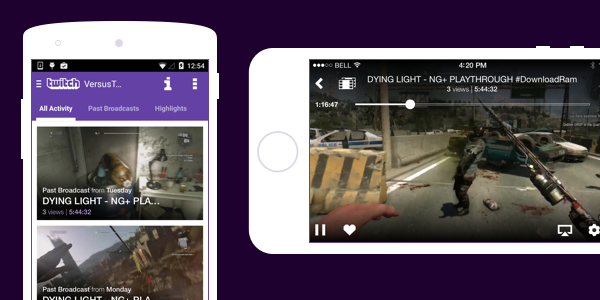
You’ve been asking for it, we’ve been working on it, and it’s finally here: VODs on mobile! You will now be able to watch highlights and past broadcasts from all Twitch Partners and a growing number of broadcasters whose videos are HLS enabled.
Available VODs are found on a channel’s Activity Feed. There are two ways to get there:
- If you’re watching a live channel, tap the Activity Feed icon located on the player. For iOS this is on the top left of the player, and for Android it’s on the bottom left.
- If you’re on the Search page or Following directory, tapping any offline channel will also take you directly to the Activity Feed.
A note for our Android users
With this release, we’ve made some changes to our Android app to address a possible security vulnerability. The change requires you to download and install a completely new app rather than update the old one. We know this isn’t ideal, and we’ll do our best to make it a one-time deal.
To get our new v4.0 app, visit g.co.play/twitchapp. After you’ve installed the new app, make sure you delete the old one (v3.2.3) from your device, as we will no longer support it starting May 20th, 2015. We apologize for this inconvenience and appreciate your patience.
EDIT: To use our new v.4.0 app, you will also need to be on Android 4.1+. For users who are on lower versions of Android, please do not delete the app. Note: v3.2.3 will not contain VODs.
The post Video On Demand Comes To Mobile! appeared first on The Official Twitch Blog.
New feature on Twitch reduces stream delay by one third
A new change coming to Twitch will pull streams closer to the present than ever before.
Enabling a new feature will reduce stream delay on the service by 33 percent on average, the streaming service announced today. To take advantage of the change, streamers need do no more than toggle a switch prior to going live in order to enable the delay reduction.

Twitch accomplished this by reducing the amount of video “stored in the processing pipeline” after video segments were cut from four seconds in length to two, thus cutting the reduction in delay between broadcaster and audience by about one third.
Georgia Price, Twitch’s product marketing manager, said the change was made in an effort to better serve the platform’s users.
“Based on community feedback, one of the major projects we have been working on over the last year is significantly reducing stream delay,” Price said.
That reduction will allow viewers of live events and matches to keep themselves that much closer to real-time results. But the change will likely be felt the most among broadcasters who lean heavily on viewer interaction.
Steaming on Twitch has become a career path for a variety of gamers, from speedrunners who burn through popular titles as quickly as possible to those who simply look to show off the latest big studio releases. And for most, interacting with viewers through Twitch chat is hugely important. It helps establish a sense of community, and motivates users to subscribe to channels and even donate to streamers whose efforts they wish to support.
Stream delays have made conversations between streamers and chat users difficult in the past. And while this won’t act as an instant cure for that difficulty, it will reduce delay and make things feel a little more dynamic.
So take heart, Twitch users: Through the glory of technological innovation, your favorite streamers will now be exposed to your kappa spam 33 percent faster.
Originally posted on DailyDot
New Chat Updates: Display Name and more!
In the last week, we’ve rolled out two updates to chat: Display Names and an emote selector. Let’s take a look at each one.
Display Names in Chat
One of our most requested updates since FOREVER is to show Display Name capitalization in chat instead of your username with the first letter capitalized. Well, we’re excited to announce that today’s the day! Your name in chat will now respect the capitalization of your Display Name. (You can manage your Display Name on your Settingspage.)
NOTE: Your Display Name must still match the characters and their sequence in your username; that is, you cannot have a different Display Name from your username. Also, no name changes. #Kappa
For now, Display Name capitalization will only be shown on web chat with other platforms coming soon, and logins will still show up in autocomplete and highlighting in Chat Mentions.
A change to your Display Name should be reflected in chat in approximately one minute.
Emote Selector
Last week we added an emote selector to chat. Click on the emote icon in the top right corner and you’ll see EVERY GLOBAL EMOTE. You’ll also see which subscriber emotes you have access to on a per-channel basis.

Keep an eye on the blog, Facebook, and Twitter for more feature updates!
Chat Mentions Comes To Mobile
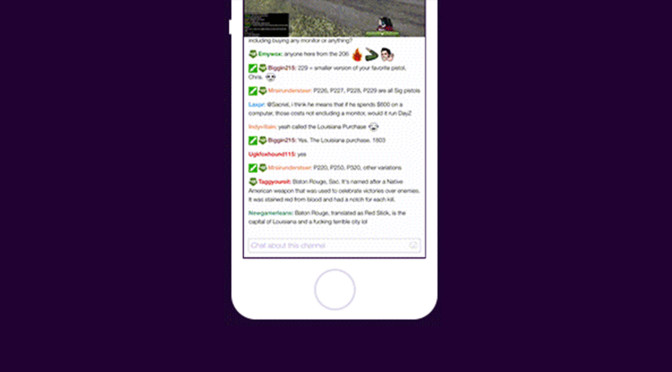
Starting today, you’ll be able to use Chat Mentions on both iOS and Android. Just like web, when you mention someone in chat, that name will be bolded in the mentioned user’s selected chat color.

To mention someone, type @ or tap on a username within the chat window. From there, you can choose to mention (happy face) or ignore a user (sad face). If you’re the moderator of a channel, you’ll also see options to time-out or ban someone. Note: You can still moderate using the viewer list.
To try these features now, update your app via Google Play or the App Store.