All posts by Radi

Watch and Chat in Full Screen with Theater Mode

Introducing Theater Mode – a new way to maximize your viewing experience on Twitch. Theater Mode lets you full-screen the video player without losing chat and features an easy-on-the-eyes black background.


Theater Mode: Full Screen
To launch Theater Mode, click the Theater Mode button below the video player.

Theater Mode
There are three ways to exit Theater Mode:

  1. Click Exit Theater Mode in the top left corner.
  2. Press ESC while in Theater Mode.
  3. Toggle out of Theater Mode using ALT-T.


Find live channels to watch in Theater Mode now!

But wait! There’s more!

We’ve also added the option to enable Dark Mode. Turn on Dark Mode for a black chat background when you aren’t in Theater Mode.

Dark Mode
 

The post Watch and Chat in Full Screen with Theater Mode appeared first on The Official Twitch Blog.

Twitch Has Acquired GoodGame To Make Pro Partnerships More Appealing

Video-game-streaming service Twitch just announced that it will acquire GoodGame, a full-service agency dedicated to serving the needs to pro-gamers and brands looking to be involved in the eSports industry.

GoodGame has built a business over the last 10 years by sponsoring its own competitive esports teams, connecting brands with popular third-party teams, creating viral content for brands looking to market to gaming enthusiasts, and more.

“We’ve been responsible for funneling more than $10 million toward players, teams, tournaments, and other parts of the esports ecosystem,” writes GoodGames CEO Alex Garfield in a letter on the company’s site explaining the sale.

The move lets Twitch capture more of the value generated by the growing esports industry, which has already been a huge key to its success — on any given day, Twitch regularly has more people watch League of Legends than concurrently watch major news networks.

With GoodGames on its team, Twitch can further ingratiate itself in the business of running teams and getting money to professional gamers. That in turn makes these popular streamers more likely to stick with Twitch when showing off their gaming chops, rather than jumping over to competitors like YouTube or Steam Broadcasting.

It also expands Twitch’s interactions with big brands. While Twitch already makes it very easy for Twitch partners (users with a large number of subscribers) to make money by playing video ads on their streams, there’s likely ample room for Twitch to move up-market in terms of quality and revenue thanks to its huge audience and focus on video content. GoodGame’s team brings with it existing working relationships and an expertise in pitching the gaming audience to companies with big budgets for brand advertising.

GG_Logo

———————-

Twitch to Acquire GoodGame

Twitch takes another big step in video game broadcasting and esports by adding more services to its partner program — bringing advertisers new ways to reach this rapidly-growing audience, and providing more revenue opportunities to broadcasters and players

SAN FRANCISCO, CA – December 9th, 2014 – Twitch, the leading video platform for gamers, today announced that it has reached an agreement to acquire GoodGame, the world’s first full-service agency dedicated to the esports and live video game broadcasting communities. Since its inception nearly a decade ago, GoodGame has grown into one of the gaming industry’s most progressive talent and content companies. The acquisition will allow Twitch to harness GoodGame’s unique service package, as well as its staff’s industry expertise and community leadership, in order to offer an even broader array of support and monetization opportunities to the greater Twitch community.

As esports and live video game broadcasting continue to grow at an explosive pace, advertisers have struggled to understand how to most effectively engage and reach this massive audience. GoodGame has helped solve this problem with an arsenal of fresh, non-traditional engagement methods uniquely suited to the ever-evolving digital media audience. This, coupled with its efforts to establish clear standards for reporting and communication of value to sponsors, has allowed GoodGame to succeed at welcoming major sponsors and advertisers into the community.

Under the leadership of its CEO, Alexander Garfield, the company has created a model that keeps players and content creators focused on what they do well while monetizing their work more effectively via advertisements, sponsorships, and merchandising. With GoodGame’s specialized skill set added to Twitch’s already industry-leading partner program, Twitch streamers will soon have even more ways to build their careers as content creators.

“GoodGame has an amazing reputation in the industry for its expertise in both sponsorship sales and talent support. Their passion for helping content creators and pro players achieve success has elevated the entire industry in the minds of brands worldwide,” said Kevin Lin, COO of Twitch. “GoodGame was a natural fit for Twitch because of our shared experience in creating compelling monetization opportunities for content partners and helping sponsors get the most out of their investments. We have worked with GoodGame CEO Alexander Garfield for several years, and there is a clear opportunity for him to bring his skills and experiences to many more of our partners.”

“We view GoodGame as a conduit,” said Alexander Garfield, CEO of GoodGame. “Its purpose is to help support as many players and broadcasters as possible by channeling revenue into our community, and making sure it stays here. I can think of no better way to accomplish that goal than by working hand-in-hand with the very same platform whose passionate audience has essentially built our company. We wouldn’t have made it to where we are today without Twitch and its users – we’re excited to give back.”

About GoodGame
GoodGame is an all-in-one talent and content company focused on gaming and esports. Over the past decade, its staff of industry veterans has worked with teams, represented players, managed tournaments, created content, and brought numerous marquee advertisers into the gaming space. GoodGame prides itself on being community-focused with the goal of supporting as many players and teams as possible by providing new and compelling monetization opportunities. For more information about GoodGame, visit www.goodgame.gg.

About Twitch
Twitch is the world’s leading live video platform and community for gamers where more than 60 million gather every month to watch and talk about video games with more than 1.1 million broadcasters. Twitch’s video platform is the backbone of both live and on-demand distribution for the entire video game ecosystem. This includes game developers, publishers, media outlets, events, user generated content, and the entire esports scene. In February 2014, Twitch was ranked the 4th largest website in terms of peak internet traffic in the U.S., fortifying the brand as an entertainment industry leader and the epicenter of social video for gamers. For more information visit: www.twitch.tv.

Forward-Looking Statements
This announcement contains forward-looking statements within the meaning of Section 27A of the Securities Act of 1933 and Section 21E of the Securities Exchange Act of 1934. Actual results may differ significantly from management’s expectations. These forward-looking statements involve risks and uncertainties that include, among others, risks related to competition, management of growth, new products, services and technologies, potential fluctuations in operating results, international expansion, outcomes of legal proceedings and claims, fulfillment and data center optimization, seasonality, commercial agreements, acquisitions and strategic transactions, foreign exchange rates, system interruption, inventory, government regulation and taxation, payments and fraud. More information about factors that potentially could affect Amazon.com’s financial results is included in Amazon.com’s filings with the Securities and Exchange Commission, including its most recent Annual Report on Form 10-K and subsequent filings.

###

Xbox One gets all new Twitch features

This is the biggest Xbox One update to date, packed with more features our community has been asking for. This includes a more personal app experience, new directories for Xbox One games, and the debut of videos on demand (VODs)!

New, personalized homepage

The redesigned homepage puts the content you follow front and center. To curate your experience, hover over any Game or Channel, press the Menu button, and select Follow.

You read that right. Following Games is a big part of this update. In addition to following broadcasters, you can follow a game, allowing you to quickly get to the games you love, without scrolling through the directory.

HP

Advanced directories for your favorite Xbox One games

Have you ever wanted to find the best Call of Duty player currently broadcasting? Now it’s possible. Twitch has teamed up with Xbox to make it easy to watch content most relevant to you.

When you navigate to the directory for any Xbox One game, you’ll see expanded filtering and sorting options. Depending on the game, you can drill down broadcasts by maps, game modes, progress, in-game activity, players stats, and skill level. The options are endless, with more Xbox One games being added over time.

Sorted Directory

It’s not just live – highlights and past broadcasts are available, too!

Xbox One is the first platform to bring you a full-featured app with Twitch video on demand (VODs). You’ll see VODs (i.e., highlights and past broadcasts) gradually added to channel pages, so you can watch even when the broadcaster is offline.

This represents the start of a new video service for Twitch, aimed at eventually delivering VODs everywhere. The rollout of this feature will be an ongoing process, with the majority of VOD content added to the program by early 2015.

Channel + VODs

This is one of the biggest Xbox One updates for Twitch ever. To help address any questions with the new features, Twitch put together a FAQ below.

Metadata FAQ

If you’re familiar with the experience on the web, you may have seen how Twitch used CS:GO metadata to enhance that game’s viewing experience. Twitch worked with Microsoft to bring this feature to console for all Xbox One games.

Q: What’s the difference between filtering and sorting?

A: Filtering lets you narrow down data by a specific criteria (i.e. show me broadcasts from this map only). Sorting lets you organize data in a certain order (i.e. show me broadcasts with the most minutes played).

Q: What games will have advanced directories?

A: All Xbox Games will automatically support the advanced directories at launch — the minimum bar for every single game is sorting via Hero Stats. In addition to Hero Stats, these games will get extra options for filtering and sorting: Minecraft, Halo MCC, Sunset Overdrive, Assassin’s Creed Unity, and Forza Horizon 2.

Some awesome examples:

  • Find the best Call of Duty player currently broadcasting by sorting by their K/D Ratio.
  • Find the best FIFA or Madden players by the number of matches won.
  • Find live broadcasters who are currently riding a hog by filtering by activity.

VODs FAQ

I know you’ve been looking forward to VODs across all platforms. This service is in its initial stages and is being debuted on the Xbox One with an eye toward serving content across all platforms in 2015.

Q: When will VODs be available on [Channel]?

A: Twitch is gradually adding VODs to the platform throughout 2015. You will see a steady increase in VOD availability and storage every month, until all broadcasters are on the new system.

Q: I see some recent Past Broadcasts for [Channel], but don’t see any content from November. What’s broken?

A: Twitch has limited storage capacity and has decided to prioritize new content. Twitch’s long term goal is to have all VODs available on all platforms (if you can watch it on the website, you’ll be able to watch it on Xbox), and Twitch is actively working towards that end.

Q: Will VODs be available on other platforms?

A: Twitch is excited to debut VODs with Xbox One first, and in updates to iOS and Android apps next year.

Dragon Age: Inquisition Twitch Stream Shows Impressive Dragon Fight

You could pick up a few tips to use in their own campaigns

Dragon Age: Inquisition has already been out for a few weeks but there are plenty of gamers who do not know exactly everything that the title has to offer, and the development team at BioWare is coming to the rescue with a new Twitch stream that allows players to take a look at one of the dragon fights that offers the most interesting challenges in the RPG.

The footage is more than half an hour long and ends somewhat abruptly, but there are some very cool moments to watch and gamers might pick up some tips that they can use in their own engagements.

Dragon Age: Inquisition can be very challenging when dealing with the flying beasts, which can breathe fire and a number of other elements, and it’s important for players to make sure that they have a solid party and that they carefully decide when to use special abilities and when to deploy their Focus-based attacks.

BioWare has said that it plans to deliver a first full patch for the title on December 9, although no information on what changes it will make has yet been offered.

Dragon Age: Inquisition will also get downloadable content at some point in 2015.

Share your videos and screenshots from Dragon Age: Inquisition in the comments bellow.

Steam takes on Twitch with built-in game streaming

Valve announced today that it is adding support for built-in live streaming to Steam. The feature is going to be called Steam Broadcasting. Gamers will be able to take advantage of this feature to broadcast their gameplay live, as well as view, live gameplay streams of friends or anyone who is broadcasting their gameplay to the public.

Watch your friends play


Now it’s not like Valve has done something completely out of the box. Gamers have had the ability to broadcast their gaming sessions through popular third party services like Twitch and Ustream, but this is the first time that Steam gets a native broadcasting feature.

Only a few browsers are supported by Steam Broadcasting at this point in time, which include Google Chrome, and Apple Safari apart from the Steam client. Since the feature is in beta stage right now players can’t monetize their streams at this point in time, and neither can streams be archived.

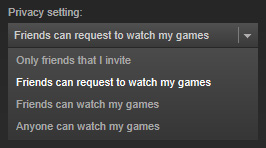
The Steam Broadcasting feature comes part and parcel of the Steam beta client. Gamers will have to opt-in to this feature in order to be able to broadcast gameplay. They will need to update their privacy settings to enable broadcasting. Streams will be available for viewing through the community hub.

Visit the Steam Broadcasting page in order to sign up for this feature.